


Trucker Path: Truck GPS & Fuel
4.722.61K Reviews
App Specs
- Version
- 7.1.3
- Updated On
- License
- Free
- Downloads
- 5,000,000+
- Developer
- Trucker Path
- Categories
- Maps & Navigation
- Platform
- Android, iOS
Screenshots
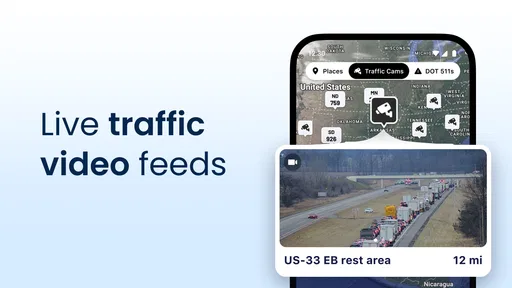
 Analysis by AppCompare
I judge trucking apps less by how impressive their maps look than by whether they help a driver make sensible decisions without creating false confidence. Trucker Path: Truck GPS & Fuel is built around the practical rhythm of a haul: choosing a truck-suitable route, finding places to refuel or pause, and checking information shared by other drivers. That focus makes it more relevant to commercial driving than a general map app, though it also means its value depends on how well its information fits your particular vehicle, route, and working habits.
A truck-focused tool, with a trust question
Trucker Path is a free Maps & Navigation app from Trucker Path. Its average rating is 4.8 from around 72,000 ratings, and it has more than a million installs. Those figures suggest that many drivers have found a reason to keep it around, but they are not a substitute for checking a route yourself. A truck-oriented screen can be reassuring; it should not be treated as proof that every road, restriction, or stop detail is current and suitable for your rig.
The app is rated for Everyone, and its current version is 6.8.4, with Android 8.0 as the minimum operating system. It is free to install, with in-app purchases ranging from $1.99 to $299.99 per item. I would treat the free download as a chance to see whether its workflow suits you, then look carefully at any purchase choice before committing. A broad price range makes it especially sensible to review what an individual purchase includes rather than assuming every useful function is included at no cost.
What I would check before relying on it
For any navigation tool used around a large vehicle, I want clear choices and dependable information more than a long feature list. The app’s truck-specific routing is aimed at avoiding restrictions such as low bridges, weight limits, and difficult turns, but I would still verify a questionable segment with current road signs and dispatch guidance. If a route looks unusual, or conditions have changed since planning, stopping to reassess is safer than letting any GPS instruction settle the question.
The same caution applies to community updates and stop details. Reports from drivers can be valuable precisely because they reflect what someone encountered on the road, but they are time-sensitive: a parking space reported as open can be gone by the time you arrive, and a road note may no longer describe current conditions. I see those reports as useful clues for planning a backup, not a guarantee that a particular facility or space will be available.
Keeping control of your choices
When I try a navigation app, I pay attention to what it asks me to do, what settings I can change, and whether I can avoid paying for something I do not need. Before entering trip or vehicle details, I would review the app’s on-screen prompts and available settings, grant only permissions that make sense for the task, and check account and purchase controls on my device. Those are practical habits for any travel app, especially one used while coordinating work and a long route.
There is no need to turn a helpful map into the sole authority on the road. I would plan with the app before departure, compare its route against the vehicle’s requirements, and use community information to identify questions worth checking. During a drive, I would make changes only when safely parked. That approach lets the app support a driver’s judgement instead of replacing it, which is the standard I want from a tool meant for demanding routes.
Worth Reading Before You Choose

EA SPORTS FC Mobile 26 Is a Bigger Football Game, but It Takes Time

Flipboard Shows What News Apps Must Do Beyond the Feed

Switching to Android Auto Means Rethinking Your Driving Routine

Google Calendar Makes a Crowded Week Easier to Manage

Ludo King Makes the Most of the Minutes Between Plans

Baby Panda World Brings Quick Play to Modern Phones, but Its Game Library Feels Busy
Mapping Your Route
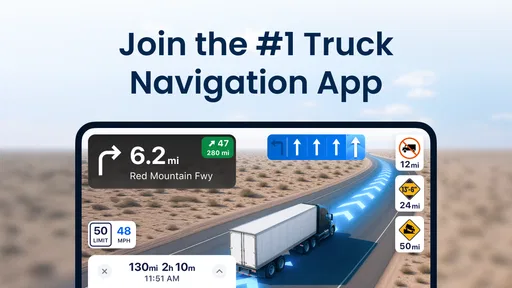
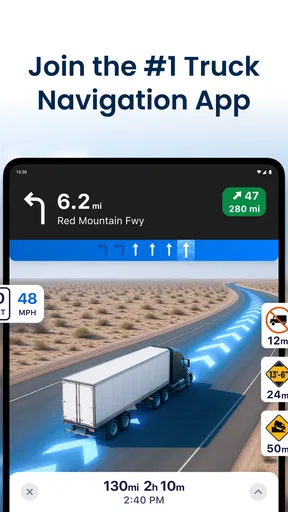
First and foremost, the GPS functionality of Trucker Path is a game-changer. Unlike regular navigation apps, this one considers truck-specific restrictions like low bridges, weight limits, and sharp turns that could turn into a nightmare if ignored. It’s like having a virtual co-pilot that ensures you’re always on the safest and most efficient route.
Fuel Stops and More
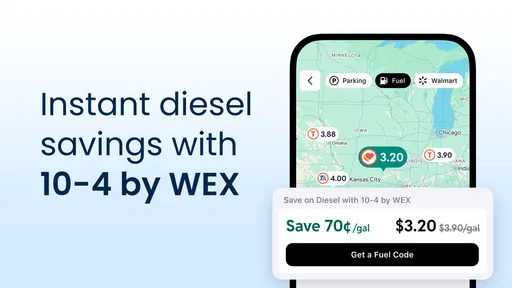
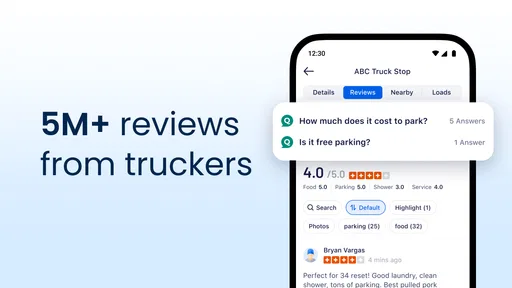
Finding the right spots for fueling up and taking a break is crucial. The app shines here by providing detailed information on over 6,000 truck stops across North America. You can check fuel prices in real-time, which is super handy for budgeting your trip. Plus, user reviews and ratings help you decide where to stop for a decent meal or a quick nap.
Community Insights
One of the coolest features is the app’s community-driven insights. Truckers can share updates about road conditions, closures, and even the availability of parking spaces. It’s like tapping into a collective brain of fellow truckers who have your back on the open road. I'm all for this sense of camaraderie!
Trip Planning Made Easy
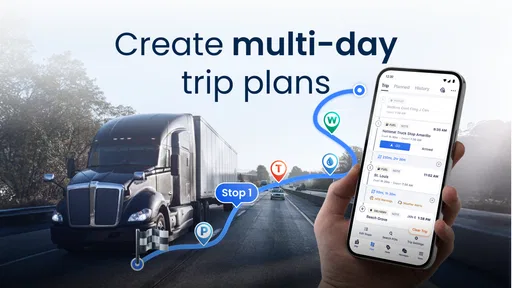
Planning your route with Trucker Path feels intuitive and straightforward. The app allows you to customize your trip based on your truck’s dimensions and load type. This personalized approach means fewer surprises and more peace of mind while driving. You can even find alternative routes if your original plan hits a snag.
Using the information without over-trusting it
Those features work best as a chain of decisions rather than as a single promise. Before setting off, I would enter the vehicle details carefully, review the proposed path for anything that seems implausible, and identify a fallback stop before reaching a busy stretch. Vehicle dimensions and load assumptions matter: a route that suits one truck may not suit another, so a saved plan should not be reused blindly after changing trailers, cargo, or equipment.
A useful habit is to check the route at two different moments: while planning, when there is time to compare options, and again before committing to a detour or unfamiliar road. The app can help surface an alternative, but the shortest-looking line is not automatically the best choice for a heavy vehicle. I would factor in the access road to a fuel stop or rest area too; reaching a destination pin is only helpful if the entrance and approach work for the truck.
Fuel and parking as decisions, not guarantees
On a long run, fuel information is most useful when it supports a plan rather than an impulse. I would compare listed prices among stops that are already sensible for the route, then consider whether a small saving is worth a longer detour or a less convenient arrival. A price can change, and a listing cannot tell me how busy the forecourt will be when I get there, so I would keep a second option in mind rather than running the tank down to one hoped-for stop.
Parking needs the same kind of backup thinking. A community report about available spaces can help me decide which location to try first, but it is not a reservation. If a stop is important for a required break, I would look ahead for another feasible place and avoid leaving the decision until the last moment. Reviews can also be read for practical clues—such as whether a stop suits a quick break or a longer pause—without treating an individual opinion as a guarantee of present conditions.
Where it fits beside ordinary navigation apps
A standard navigation app is often the simpler choice for a car, a short personal trip, or someone who only needs familiar turn-by-turn directions. Trucker Path’s appeal is its trucking context: restrictions, truck stops, fuel and parking concerns, and driver-contributed observations belong in the same planning conversation. That does not make it a replacement for every map or professional workflow. For a complex delivery, a route mandated by an employer, or a road where local instructions take precedence, I would use it as a second source and follow the applicable guidance.
It is also a different kind of tool from a static road atlas. A map on paper can be a dependable reference when a phone is inconvenient, but it cannot offer the same changing community reports or convenient stop searches. Conversely, an app depends on a working device and current information. I would keep whatever offline or backup navigation method my work requires, rather than assuming a phone app alone covers every situation.
A realistic day on the road
Imagine starting a morning haul with a fixed destination and a limited window for fuel and rest. I would first set the truck details, inspect the suggested route, and note a suitable fuel stop before the tank becomes urgent. As the day progresses, I could use a recent parking update to choose which stop to try, while keeping another option in mind in case the report is stale or spaces have filled. If traffic or a closure forces a change, I would pull over somewhere safe, compare the proposed alternative with the truck’s constraints, and only then continue.
That workflow is where the app can earn its place: not by removing every uncertainty, but by bringing several truck-related questions into one planning routine. Drivers who regularly cover unfamiliar routes and make their own stop decisions are likely to get more from it than someone who takes the same local roads each day and already knows the facilities. New drivers may appreciate having truck-oriented information in one place, but they should still learn how to verify restrictions and ask for guidance when a route is uncertain.
Practical friction and who may prefer another option
The main trade-off is that useful-looking information can encourage overconfidence. A route designed around truck constraints still needs a driver’s check, and user reports age quickly. That adds a little work: reviewing the path, keeping a fallback stop, and confirming an unexpected instruction. For me, that is a reasonable cost for a specialized planning aid, but it may frustrate someone who expects a navigation app to make every decision automatically.
I would also be cautious about using a phone while driving. Route changes, searching for fuel, and reading reports are tasks for before departure or while parked, not for a moving vehicle. Drivers who need a very simple interface, do not want to share trip or vehicle information with an app, or rarely travel beyond familiar roads may be better served by a basic navigation option and a separate planning routine. Anyone considering paid items should inspect the specific purchase and available account controls first; the free install alone does not tell you whether a paid choice is worthwhile for your needs.
My cautious recommendation
For truck drivers who plan routes, compare fuel stops, or want timely notes from other drivers, I think Trucker Path is worth trying as a companion rather than an unquestioned authority. Its focus is more useful to a working trucker than a conventional car map when vehicle restrictions and truck-stop decisions shape the day. I would start with a real route I know well, compare what the app suggests with my usual method, and learn how its trip and stop information behaves before relying on it somewhere unfamiliar.
My recommendation comes with a clear boundary: trust your vehicle information, road signs, current conditions, and professional instructions over a screen whenever they conflict. Used with that judgement—and with a backup plan for fuel or parking—the app can make trip preparation more organized. If you only need ordinary directions, or want certainty without checking anything yourself, its specialized approach may not be the right fit.
Fuel Stops and More
Finding the right spots for fueling up and taking a break is crucial. The app shines here by providing detailed information on over 6,000 truck stops across North America. You can check fuel prices in real-time, which is super handy for budgeting your trip. Plus, user reviews and ratings help you decide where to stop for a decent meal or a quick nap.
Community Insights
One of the coolest features is the app’s community-driven insights. Truckers can share updates about road conditions, closures, and even the availability of parking spaces. It’s like tapping into a collective brain of fellow truckers who have your back on the open road. I'm all for this sense of camaraderie!
Trip Planning Made Easy
Planning your route with Trucker Path feels intuitive and straightforward. The app allows you to customize your trip based on your truck’s dimensions and load type. This personalized approach means fewer surprises and more peace of mind while driving. You can even find alternative routes if your original plan hits a snag.
In conclusion, if you're a truck driver looking to take the stress out of your travels, Trucker Path: Truck GPS & Fuel is worth checking out. It combines practical tools with community support, making it much more than just a navigation app. It's like having an entire truck stop in your pocket! Give it a whirl and see how it can transform your trucking experience.
Pros
- Accurate real-time GPS navigation.
- Extensive database of truck stops.
- Customizable routes for truck dimensions.
- Fuel price comparisons save money.
- Active community with helpful reviews.
Cons
- Occasional app crashes reported.
- Some features require a subscription.
- Can drain battery quickly.
- Limited offline functionality.
- Ads can be intrusive.
FAQs for Trucker Path: Truck GPS & Fuel
What features does Trucker Path offer for truck drivers?
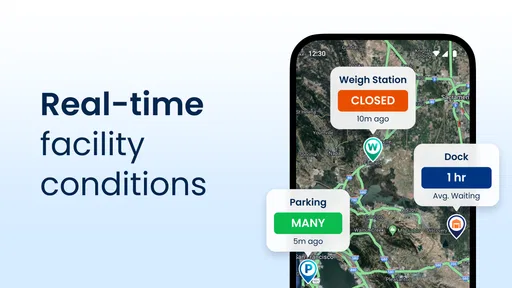
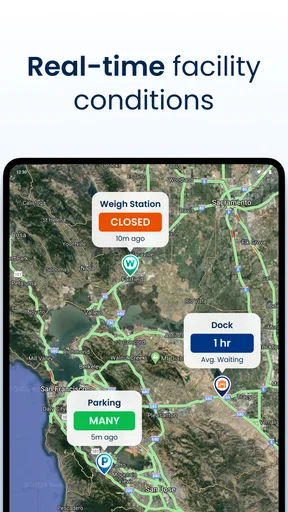
Trucker Path provides a comprehensive suite of tools tailored for truck drivers. Key features include a specialized GPS for truck routes, real-time updates on weigh stations, rest areas, and parking availability. It also offers fuel pricing information and community reviews to help drivers make informed decisions on the road.
How accurate is the GPS routing in Trucker Path?
The GPS in Trucker Path is specifically designed for truckers, taking into account vehicle dimensions and road restrictions. It provides routes that avoid low bridges and unsuitable roads, offering reliable and accurate navigation. User feedback suggests a high level of satisfaction with its real-time traffic updates and rerouting capabilities.
Is Trucker Path free to use or does it require a subscription?
Trucker Path offers a free version with essential features, but for full access to advanced functionalities like premium maps and ad-free experience, a subscription is required. The app provides different pricing tiers, allowing users to choose a plan that suits their needs and budget effectively.
How does Trucker Path help with finding truck stops and parking?
Trucker Path includes a robust database of truck stops and parking locations, updated in real-time by its community of users. Drivers can view availability, amenities, and user reviews for each location, ensuring they find suitable and safe stops during their journeys. This feature significantly reduces the stress of finding parking.
Can Trucker Path be used offline, and how reliable is it without internet access?
Trucker Path allows users to download maps for offline use, which is highly beneficial in areas with poor connectivity. While offline, drivers can still access essential features like GPS navigation and saved routes. However, real-time updates and community reviews require internet access for the latest information.


